


AI online video editors use artificial intelligence to automate and improve the video editing process. They make it easier to produce engaging video content for users at different skill levels. Using advanced algorithms, these platforms can analyze footage, recommend edits, and assemble complete videos from user preferences. The technology helps address common constraints such as limited time and the need for consistent production quality. This article examines automation in online video creation, key features of AI editing tools, and their role in social media marketing and lead generation.
Key Takeaways
- AI online video editors automate editing tasks, significantly reducing production time and effort for users.
- These editors use machine learning techniques like computer vision and natural language processing for intelligent editing.
- User-friendly interfaces and customizable templates make AI video editors accessible to users with varying expertise.
- AI video editors enhance social media marketing by producing tailored, high-quality videos that boost engagement and lead generation.
- Personalization features allow AI editors to create videos that resonate with specific audiences, increasing viewer engagement.
- Mobile and web-based AI editors offer different advantages, balancing convenience with advanced editing capabilities.
- Subscription plans vary to accommodate individual users, small businesses, and large organizations with scalable features.
- Best practices for AI video editing include using engaging visuals, clear narration, and consistent branding for effective communication.
Automation of Online Video Creation

AI automates multiple stages of video production, reducing the time and effort needed to deliver professional-quality output. Automation covers tasks such as script parsing, asset selection, and scene timing and assembly. By streamlining these steps, AI editors let creators focus on creative direction rather than technical detail. For example, an editor can parse a script and automatically select relevant clips and audio so the final video aligns with the intended message. This approach improves efficiency and supports a more tailored production workflow.
Studies demonstrate that automated editing tools can substantially reduce production time compared with traditional methods.
Automated Video Editing for Time Efficiency Automated editing technology offers notable efficiencies in educational video production. This study contrasts the time-saving benefits of automated editing against manual professional editing. Raw learning video footage was recorded in a professional studio with a green screen and presented in a frontal lecture style. The raw footage underwent editing by both an automated tool and professional editors. Time comparison results revealed significant savings with the use of automated tools. Evaluating the efficacy of automated video editing in educational content production: a time efficiency and learner perspective study, S Schön, 2024
Key Features Enhancing the Video Editing Process
AI video editing tools include several features designed to improve the editing workflow. Key capabilities include:
- User-Friendly Interfaces : Most AI video editors are designed with intuitive interfaces that make it easy for users to navigate and utilize the software effectively.
- Customization Options : Users can personalize their videos by selecting themes, styles, and music that align with their brand identity.
- Templates and Automation : Many platforms offer pre-designed templates that can be customized, allowing users to create videos quickly without starting from scratch.
Together, these capabilities increase efficiency and simplify the production of high-quality video content.
| Feature | Description | Benefit |
|---|---|---|
| User-Friendly Interfaces | Intuitive design for easy navigation | Reduces learning curve for new users |
| Customization Options | Ability to personalize videos | Enhances brand identity and engagement |
| Templates and Automation | Pre-designed formats for quick editing | Saves time and effort in video production |
How Does an AI Online Video Editor Work to Automate Video Editing Tasks?
AI online video editors rely on machine learning models and natural language processing to automate editing decisions. These technologies allow the software to interpret context and select appropriate clips, ensuring the final video is coherent and engaging. Features such as text-to-speech can provide voiceovers, further reducing manual steps. This automation shortens production time and helps maintain consistent output quality.
What Machine Learning Techniques Enable Automated Video Editing?
Several machine learning techniques support automated video editing. These include:
- Computer Vision : This technique allows the software to analyze visual content, identifying key elements such as faces, objects, and scenes.
- Natural Language Processing (NLP) : NLP enables the software to understand and interpret scripts, making it easier to match video content with the intended message.
- Deep Learning : This advanced form of machine learning helps improve the accuracy of video editing decisions by analyzing vast amounts of data and learning from patterns.
These methods combine to provide a smoother editing workflow and enable users to produce quality videos with less manual effort.
How Does AI Streamline the Video Editing Workflow?
AI reduces repetitive work and offers intelligent suggestions throughout the editing process. For example, script parsing identifies key themes and messages that guide clip and audio selection. AI also assists with final adjustments, such as color correction and audio balancing, to refine output quality. By automating these functions, AI editors let creators prioritise storytelling and strategic decisions.
What Are the Key Features of AI Content Creation Platforms for Video Editing?
AI content creation platforms for video editing provide a set of features aimed at simplifying production and improving results. Key features include:
- Automation Capabilities : These platforms can automate various editing tasks, reducing the time required to produce videos.
- User Interface Design : A well-designed interface makes it easy for users to navigate the software and access its features.
- Integration Options : Many AI video editors can integrate with other tools and platforms, allowing for a more streamlined workflow.
These features make AI video editing platforms practical tools for creators seeking to enhance production efficiency and quality.
How Do Personalization and Scalability Enhance Video Content?
Personalization and scalability are key to modern video strategies. Personalization lets creators tailor content to specific audiences, improving relevance and engagement. AI editors can analyze viewer data to recommend elements that resonate with target demographics. Scalability enables efficient production of larger volumes of content so teams can meet the pace of social media and marketing demands.
How Can AI Video Editing Software Improve Social Media Marketing and Lead Generation?
AI video editing software supports social media marketing and lead generation by enabling faster production of platform-optimised, high-quality videos. These tools can tailor videos to channel requirements and analyze engagement metrics to inform future content decisions. This data-driven workflow helps marketers refine campaigns and improve conversion outcomes.
What Benefits Does Automated Video Creation Offer Marketers?
Automated video creation delivers several benefits for marketers, including:
- Speed and Efficiency : AI video editors can produce content much faster than traditional methods, allowing marketers to respond quickly to trends.
- Cost-Effectiveness : By reducing the need for extensive editing teams, automated video creation can lower production costs.
- Improved Engagement Metrics : High-quality, engaging videos are more likely to capture audience attention, leading to better engagement rates.
These advantages make automated video creation an effective option for marketers aiming to scale and optimise their content strategies.
How Does Video Personalization Increase Audience Engagement?
Video personalization raises engagement by delivering content that aligns with viewer preferences. By analyzing behavior and preferences, AI editors can suggest themes, styles, and messaging that resonate with target audiences. This relevance increases viewer retention and strengthens the relationship between brand and audience, supporting loyalty.
What Are the Advantages of Using Video Editing Mobile Apps?
Mobile video editing apps provide practical benefits for creators working on location or on tight schedules. Advantages include:
- Accessibility and Convenience : Users can edit videos anytime and anywhere, making it easier to capture and share content quickly.
- User-Friendly Interfaces : Many mobile apps are designed with intuitive interfaces, allowing users to edit videos without extensive training.
- Integration with Social Media : Mobile apps often provide direct sharing options to social media platforms, streamlining the content distribution process.
These features make mobile apps a practical choice for creators who prioritise flexibility and speed.
How Do Web-Based AI Editors Compare in Functionality?
Web-based AI editors provide a different set of capabilities compared with mobile apps. While mobile solutions prioritise convenience, web platforms often include more advanced tools and higher performance. Typical strengths include:
- Comprehensive Features : Web-based editors typically offer a wider range of editing tools and options, allowing for more complex video projects.
- Collaboration Tools : Many web-based platforms facilitate collaboration among team members, enabling multiple users to work on a project simultaneously.
This contrast highlights the strengths of each approach and helps users select the option that best fits their project requirements.
What Are the Pricing and Subscription Options for AI Online Video Editors?
AI online video editors commonly provide tiered pricing to address different user needs. Typical plans include:
- Basic Plan : Often includes essential features for individual users or small projects.
- Pro Plan : Provides additional features and capabilities for more advanced users or teams.
- Business Plan : Designed for larger organizations, offering comprehensive tools and support.
Tiered pricing allows users to choose a plan that matches their feature requirements and budget.
How Do Different Subscription Plans Cater to Various Business Sizes?
Subscription plans are structured to support different organisational sizes. Small businesses often benefit from basic plans that provide core features at lower cost, while larger organisations may require business-tier plans with advanced tools and collaboration support. This scalability ensures a broader range of users can adopt AI video editing.
What Should Users Consider When Choosing a Pricing Plan?
When selecting a pricing plan, users should evaluate a few key factors, including:
- Features Evaluation : Assessing which features are necessary for their specific video editing needs.
- Usage Limits : Understanding any limitations on video length, storage, or export options associated with each plan.
A careful review of these factors helps users select a plan that delivers the best return on investment.
What Common Questions Do Users Have About AI Video Editing Software?
Users commonly raise several questions when evaluating AI video editing software, including:
- What features should I look for? : Users should prioritize features that align with their editing needs, such as automation capabilities and user-friendly interfaces.
- Is AI video editing software suitable for beginners? : Many AI video editors are designed with intuitive interfaces, making them accessible for users with little to no editing experience.
- How can I ensure the quality of my videos? : Utilizing high-quality footage and leveraging the software’s advanced editing features can help maintain video quality.
These questions reflect the practical concerns users have when comparing AI editing options.
How Does AI Personalize Video Content Effectively?

AI personalizes video content by analyzing viewer data and preferences to recommend tailored elements such as themes, styles, and messaging. Machine learning models enable continuous improvement of these recommendations so content remains relevant and engaging. This targeted approach improves viewer satisfaction and strengthens the connection between brand and audience.
What Are the Best Practices for Using AI Video Editors?
To maximize the benefits of AI video editors, users should follow several best practices:
- Engaging Visuals : Incorporating high-quality visuals and graphics can enhance the overall appeal of the video.
- Clear Narration : Ensuring that the audio is clear and well-paced helps maintain viewer engagement.
- Consistent Branding : Using consistent branding elements, such as logos and color schemes, reinforces brand identity.
Adhering to these practices helps creators deliver compelling videos that communicate their message effectively.
For those evaluating online video editor features, review the available options to determine which tools meet your needs.
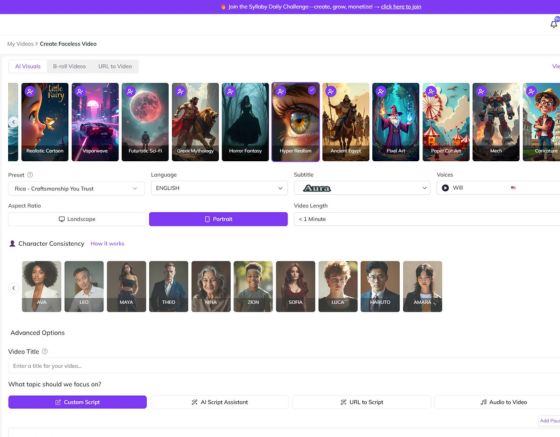
To streamline video production, consider Syllaby , a platform that automates and enhances editing workflows.
If you wish to explore how AI can transform different sectors, review the industries that are applying AI to content creation.
For questions or assistance, please contact us for support and guidance.
To compare plans and understand the value of Syllaby, review the available pricing options to select a plan that fits your requirements.
Frequently Asked Questions
What types of videos can I create using AI online video editors?
AI online video editors support a broad range of formats, including promotional videos, social media clips, educational tutorials, and personal projects such as vlogs. Templates and customization options allow creators to adapt content for different audiences and purposes, making these tools suitable for both professional and casual use.
How does AI video editing software handle audio elements?
AI video editing software typically includes advanced audio processing: automatic leveling, background noise reduction, and text-to-speech voiceovers. Users can also access libraries of royalty-free music. Automating these audio tasks ensures that sound quality aligns with visual elements for a cohesive final product.
Can AI video editors be used for live streaming?
Most AI video editors focus on post-production, but some platforms offer live-stream support such as real-time editing, integration with streaming services, and overlay tools. Users should verify specific platform capabilities, as dedicated streaming software may be preferable for complex live broadcasts.
What are the limitations of using AI video editing tools?
AI video editing tools have limitations: they excel at routine tasks but may not replicate the nuanced creativity of an experienced human editor. Complex artistic edits and deeply custom workflows can be challenging. Recognizing these limits helps users set realistic expectations and plan for manual refinement where needed.
How secure is my data when using AI video editing platforms?
Data security is an important consideration. Reputable platforms use encryption and secure storage to protect user data, but users should review privacy policies and terms of service. Avoid uploading sensitive or confidential material unless the provider explicitly guarantees appropriate protection.
Are there any specific hardware requirements for using AI video editors?
Hardware requirements vary by platform and feature set. Generally, a modern processor, at least 8GB of RAM, and a dedicated graphics card improve performance for high-resolution editing. For mobile apps, recent smartphones or tablets with sufficient storage and processing power are usually adequate. Check the specific requirements of the chosen software to ensure optimal performance.
How can I learn to use AI video editing software effectively?
Effective learning combines vendor documentation, platform tutorials, and community forums. Online courses and video guides provide practical tips, and hands-on practice with small projects builds proficiency. Engaging with user communities can offer additional support and inspiration.
Conclusion
AI online video editors streamline content production by automating complex editing tasks and making high-quality video production more accessible. With personalization and user-friendly interfaces, these tools improve engagement and optimise workflows for marketers and creators. By leveraging AI, users can produce tailored videos that resonate with their audience and drive better results. Discover the potential of AI video editing by exploring our platform today.