





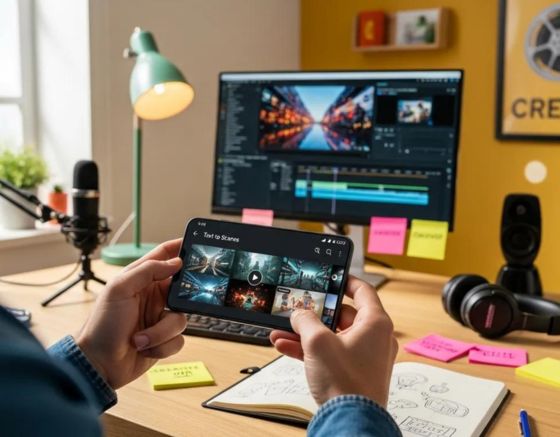
Editing and customising AI-generated scenes improves video quality and viewer engagement. The Text to Scenes Android app from Syllaby converts text into dynamic scenes and provides tools for targeted refinement. This article summarises the app’s primary features, outlines a step-by-step editing workflow, and details the available customisation options. Applied correctly, these tools streamline production and help creators deliver content that aligns with audience needs.
This guide covers the app’s core capabilities, a practical editing workflow, customisation features, and use cases for social media and lead generation. It also summarises subscription options and common troubleshooting steps. By the end, readers will understand how to optimise the Text to Scenes app for consistent video output.
Key Takeaways
- The Text to Scenes Android app enables efficient AI-generated video creation through intuitive editing and customization tools.
- Users can personalize videos by adjusting visual elements, scripts, timing, and transitions to match their brand identity.
- The app’s mobile-friendly interface supports quick scene fine-tuning and seamless navigation on Android devices.
- Editing AI-generated scenes involves script input, automatic scene generation, review, customization, and final video export.
- Customization features include adding background music, sound effects, and visual transitions to enhance viewer engagement.
- Subscription plans offer varying access to advanced editing tools, storage, and priority support for content creators.
- Content creators can leverage the app to produce engaging social media videos and generate leads efficiently.
- Troubleshooting resources and tutorials are available on Syllaby’s website and within the app to resolve common issues.
What Are the Key Features of the Text to Scenes Android App for AI Scene Editing?
The Text to Scenes Android app bundles intuitive editing tools with extensive customisation controls and a clear interface. Automation speeds scene generation, while manual controls enable precise adjustments. The result is a mobile workflow suited to creators who need rapid, professional-looking video output.
Which AI-generated video customization options does the app provide?

The app supports multiple customisation options to align videos with brand and message. Users can modify visual attributes such as colour and style, and adjust narrative elements by editing scripts so visuals and text convey the intended message.
This approach reflects developments in AI-driven content creation, where systems automate tasks while allowing user-led personalisation of media outputs.
The Role of Artificial Intelligence in the Automation and Personalization of Video Content Creation
Artificial intelligence (AI) is transforming modern media by automating content development and customization, significantly impacting creative industries. This systematic literature review (SLR) analyzes 30 papers sourced from Scopus (45) and JSTOR (25), utilizing the PRISMA methodology to ensure a comprehensive and structured synthesis of existing research. The findings reveal three primary themes: (1) AI-Generated Content and Creative Automation: AI-powered techniques such as natural language processing (NLP), generative adversarial networks (GANs), and deep learning models facilitate automated narrative generation, AI-generated text, digital artwork, and video content creation. These technologies enhance efficiency and scalability, while simultaneously raising questions regarding originality, authenticity, and creative agency. (2) Personalization and Adaptive Media, which explores how AI-driven recommendation systems, sentiment analysis, and predictive analytics can improve user engagement by tailoring information to individual preferences. AI-Driven Creativity in New Media: A Systematic Literature Review on Automated Content Generation and Personalization, MEA Hashim, 2025
How does the app support mobile-friendly scene fine tuning on Android?
The Text to Scenes interface is optimised for Android devices to simplify scene fine-tuning. A clear layout and AI-assisted controls enable rapid adjustments to visuals and timing, allowing users to refine scenes quickly without sacrificing output quality.
How Do You Edit AI-Generated Scenes Step-by-Step in the Text to Scenes Android App?
Editing AI-generated scenes follows a concise workflow that balances automation with manual review. The sequence below helps users produce reliable video drafts and final exports.
- Sign Up and Access the App: Begin by downloading the Text to Scenes app from the Google Play Store and creating an account.
- Input Scripts: Enter your text scripts into the app, which will generate corresponding video scenes based on the content.
- Generate Scenes: Use the app’s AI capabilities to automatically create scenes that visually represent your script.
- Review and Customize Scenes: After generating scenes, review them for accuracy and make any necessary adjustments to visuals and text overlays.
- Finalize the Video: Once satisfied with the edits, finalize your video and prepare it for sharing on various platforms.
What is the process for selecting and modifying scenes within the app?
Selecting and modifying scenes is straightforward. Users can preview generated scenes, choose those that match the narrative, and apply edits such as visual replacements, timing adjustments, and revised text overlays to improve storytelling coherence.
How can users apply personalization and adjustments to video scenes?
Personalisation is achieved by refining input prompts and using the app’s visual controls. Tools allow changes to character appearance, background assets, and transition styles. These options ensure the final video reflects brand guidelines and audience expectations.
What Customization Features Enhance AI Video Scenes in the Text to Scenes Android App?
Customisation features expand the app’s utility by enabling users to adapt scenes for specific objectives and audiences. For full details on Syllaby’s capabilities, consult the Syllaby official website.
How to use scene elements and effects to tailor AI-generated videos?
Users can add scene elements and effects to improve engagement. Options include background music, sound effects, and visual transitions that support the narrative and increase viewer attention.
Which tools enable fine tuning of video timing and transitions on Android?
The app provides timing controls and transition settings for precise pacing. Users can set scene duration, adjust cut points, and select transition types to produce smooth, professional edits that match the intended flow.
This capability to convert text into dynamic video content represents a practical application of current AI methods in media production.
Automated Text-to-Video Conversion for User-Centric Content Generation
This paper presents a machine learning-based system designed for the automated conversion of text to audio and text to video, catering to user-defined requirements. Recognizing the challenges associated with extensive text consumption, the proposed Text-to-Speech (TTS) model facilitates ease of access by converting text into audio, augmented with a lip-synced avatar for enhanced engagement and human-like interaction across multiple languages. The TTS model is architected upon Waveform Recurrent Neural Networks (WaveRNN), an autoregressive model that predicts future data states from current observations. The system employs keyword identification from input texts, leveraging diffusion models to synthesize high-quality video content. Video generation is further supported by Generative Adversarial Networks (GANs). Frame interpolation techniques are utilized to seamlessly merge adjacent frames, enabling the creation of slow-motion video sequences. The system integrates diverse datasets including WebVid-20M, ImageNet, and Hugging Face for text-to-video processing, alongside the LibriTTS corpus and Lip Sync datasets for text-to-audio conversion. Ultimately, the system delivers a user-friendly and automated platform, efficiently transforming textual input into either high-fidelity audio or high-resolution video outputs. TEXT2AV–Automated text to audio and video conversion, 2023
How Can Content Creators Leverage the Text to Scenes App for Social Media and Lead Generation?

Creators can use the Text to Scenes app to scale social media output and support lead generation. Fast scene generation and straightforward editing permit frequent publishing and platform-specific adaptations that improve reach and viewer response.
Syllaby’s mobile-first design enables creators to produce and publish high-quality videos directly from Android devices, which suits professionals who require efficient, on-the-go workflows.
The Text to Scenes app demonstrates practical advances in text-to-video technology designed to address diverse content production requirements.
Text-to-Video Generation: Advances and Applications in Content Creation
Text-to-video (T2V) generation is an emerging field that integrates natural language processing with computer vision, enabling the creation of video content from textual descriptions. This review provides a comprehensive analysis of the latest advancements in T2V systems. We begin with a thorough literature survey, covering fundamental models and methodologies, commonly used datasets, and comparative assessments of state-of-the-art approaches. Subsequently, we examine training strategies and evaluation techniques, focusing on the quantitative and qualitative metrics utilized to gauge T2V performance. The paper explores various applications, including content creation, education, virtual reality, and e-commerce, while also highlighting key challenges associated with T2V-generated videos such as temporal consistency, semantic alignment, and scalability. Finally, we discuss prospective future directions to address these challenges and expand the utility of T2V technology. Text-to-video generators: a comprehensive survey, MT Jan, 2025
What Subscription Plans and Pricing Options Support Access to Editing Features in the Text to Scenes App?
The Text to Scenes app provides multiple subscription plans to meet varied user requirements. Plans grant access to advanced editing tools, expanded storage, and priority support. Creators should review the available subscription plans to determine the appropriate level of service for their projects.
How do subscription tiers affect access to AI scene editing and customization tools?
Subscription tiers define feature access and resource limits. Higher tiers commonly include additional editing functions, greater storage allocation, and enhanced export options. Selecting an appropriate tier ensures access to the tools required for specific production needs.
What are the benefits of premium plans for advanced video editing on Android?
Premium plans provide access to exclusive editing tools and priority customer support, which streamline complex production tasks. These benefits are suited to creators who require advanced capabilities and faster support response times.
How to Troubleshoot Common Issues When Editing AI-Generated Scenes on Android?
Users may encounter technical or workflow issues when editing AI-generated scenes. A structured troubleshooting approach and reference to official support materials help maintain productivity and reduce downtime.
What are typical challenges in customizing AI video scenes and how to resolve them?
Common challenges include selecting the most appropriate scene and correcting visual alignment. To address these, consult the app’s help resources or community forums for step-by-step guidance. Keeping the app updated also reduces the likelihood of technical faults.
Where to find tutorials and support resources for the Text to Scenes Android app?
Tutorials and support materials are available on Syllaby’s website and within the app. Resources include step-by-step guides, video walkthroughs, and a comprehensive FAQ. For direct assistance, consult the Syllaby contact page.
Frequently Asked Questions
What types of content can be created using the Text to Scenes app?
The Text to Scenes app supports a variety of content formats, including promotional videos, educational clips, social media posts, and narrative videos. Its customisation tools enable alignment to specific themes and messaging for different platforms.
Can the Text to Scenes app be used for collaborative projects?
Yes. While the app is optimised for individual use, projects can be shared with colleagues for feedback and collaborative editing, which benefits marketing teams and multi‑user production workflows.
Is there a limit to the number of videos I can create with the app?
The volume of videos that can be produced depends on the chosen subscription. Lower-tier plans may limit exports or storage, whereas premium plans typically offer expanded storage and fewer production limits. Review plan terms to confirm specific restrictions.
How does the app ensure the quality of AI-generated scenes?
The Text to Scenes app uses advanced AI models to produce scenes that are visually coherent and contextually relevant. Users can review and edit outputs to meet quality standards, while automation features help maintain consistent style and narrative flow.
What are the best practices for using the app to maximize engagement?
To maximise engagement, use concise scripts, strong visuals, and appropriate audio elements. Tailor content to the target audience, optimise length for each platform, and test different formats regularly to determine what performs best.
Are there any specific device requirements for using the app effectively?
The app is built for Android devices; users should ensure adequate storage, a compatible OS version, and a stable internet connection for asset downloads and updates. The Google Play Store listing provides detailed requirements.
Conclusion
The Text to Scenes app enables creators to produce polished videos efficiently through a combination of AI automation and manual controls. Its editing tools and customisation options support higher engagement and faster production cycles. Reviewing the app’s features and subscription tiers will help teams select the configuration that best supports their content strategy.