





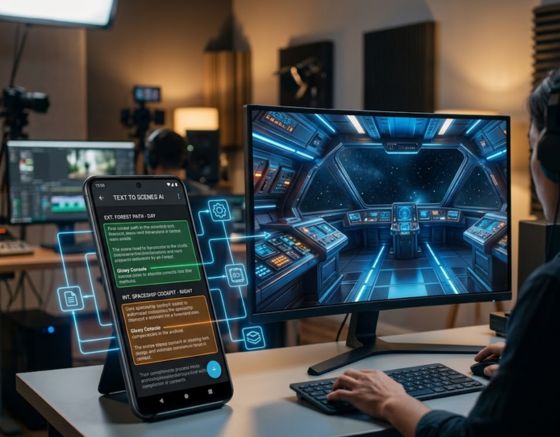
The Text to Scenes AI Android app automates the matching of visuals to scripts, reducing production time for content creators. It applies advanced algorithms to analyze script text and generate corresponding video scenes, serving marketers, educators, and social media managers. Many creators face the time-consuming task of visualizing scripts and lack the design skills needed to produce engaging visuals. The app addresses this by providing an intuitive platform that simplifies video production. This article examines the app’s underlying technology and algorithms, the scene-matching process, user benefits, and personalization features for social media creators.
The concept of AI tools that automatically generate video content is a recognised advancement in the field.
AI-Powered Automatic Video Content Generation
Authors identify categories of services promoted as AI for video content, including “Video Generators”—services that create videos automatically. Artificial intelligence–powered video content generation tools, CM Roșca, 2024
Key Takeaways
- The Text to Scenes AI Android app automatically matches visuals to scripts using advanced AI and machine learning algorithms.
- The app analyzes script context, tone, and key elements to generate accurate and relevant video scenes.
- Users can customize AI-generated scenes to reflect their unique style and branding for social media content.
- The app requires no design skills, making video creation accessible to marketers, educators, and small businesses.
- Integration with other content creation tools streamlines workflow and enhances video production efficiency.
- Personalization features increase audience engagement by tailoring video content to specific creator needs.
- The app supports scalability, enabling users to produce high-quality videos regardless of project size or complexity.
- Subscription plans offer flexible features and free trials allow users to explore the app before subscribing.
- Industries like real estate, education, and marketing benefit significantly from automated script-to-video conversion on Android.
Technology and Algorithms
The Text to Scenes AI Android app uses modern AI models to convert written scripts into video scenes. These models evaluate context and tone within the script to inform scene selection. By identifying key elements and themes in the text, the app aligns visuals with the narrative and reduces the time needed for video production.
Process of Scene Matching
Scene matching starts with user input: creators enter their scripts into the app. The app analyses the text and selects visuals that reflect the script’s tone and context. Generated scenes can then be customised so the final output meets specific creative and brand requirements.
Benefits for Users
The Text to Scenes AI Android app delivers practical benefits that streamline video creation and improve output quality. Key benefits include:
- Speed and Efficiency: The app significantly reduces the time required to create videos, allowing users to focus on other aspects of their projects.
- No Design Skills Required: Users do not need to possess any design expertise, making the app accessible to a broader audience.
- Integration with Other Tools: The app can easily integrate with various content creation tools, streamlining the workflow for users.
| Benefit | Description | Impact Level |
|---|---|---|
| Speed and Efficiency | Reduces video creation time | High |
| No Design Skills Required | Accessible to all users | Medium |
| Integration with Other Tools | Enhances workflow | High |
The app’s efficiency and scalability enable content creators to produce professional videos without the usual constraints of time or specialist skills.
What AI Algorithms Power the Text to Scenes Android App?

The Text to Scenes app relies on AI and machine learning techniques to generate scenes from scripts. Natural Language Processing (NLP) methods identify characters, settings, actions, and other key elements in the script, which guide the selection and composition of visuals.
How Does Machine Learning Analyze Script Text for Scene Matching?
Machine learning enables the app to interpret script nuances by extracting dialogue, descriptive cues, and narrative structure. This analysis informs visual choices and supports coherent scene construction that aligns with the story.
What Role Do AI Scene Matching Software Techniques Play?
AI scene-matching techniques maintain character consistency and preserve the script’s emotional tone. By using dynamic visual elements, the app adapts scenes to different contexts and provides a versatile tool for varied production needs.
How Does the App Personalize Video Content for Social Media Creators?

The Text to Scenes app includes personalization controls tailored for social media creators. Users can adjust style and branding parameters so generated scenes reflect their visual identity and improve audience relevance.
Can Users Customize AI-Generated Video Scenes?
Users can customise AI-generated scenes by refining prompts, modifying details, and regenerating scenes until they match the intended vision. This workflow preserves creative control while leveraging automated generation.
What Benefits Does Personalization Bring to Content Creators?
Personalization delivers several benefits, including:
- Increased Engagement: Tailored content resonates more with audiences, leading to higher engagement rates.
- Automated Personalization: The app automates the personalization process, saving time for creators.
- Dynamic Adaptation: The ability to adjust visuals in real-time allows for quick responses to audience feedback.
What Are the Steps to Use the Text to Scenes AI Android App Effectively?
Using the Text to Scenes AI Android app involves a few clear steps: sign up, access the app, input scripts, and generate scenes. The interface guides users through each stage to ensure a smooth workflow.
How to Input Scripts and Generate Video Scenes Automatically?
To input scripts, type or paste the text into the designated field. The app processes the content and produces corresponding scenes based on its analysis. Review and adjust generated scenes before finalising the video.
How to Edit and Refine AI-Matched Visuals Within the App?
Editing is integrated into the app: access the editor to customise scenes, change visual elements, and save revisions. The editor provides controls for precise adjustments to meet project requirements.
Which Industries Benefit Most from Script to Video Automation on Android?
Several industries benefit from automated script-to-video workflows on Android, including:
- Real Estate: Creating property showcase videos quickly and efficiently.
- Education: Developing engaging educational content for students.
- Marketing: Producing promotional videos that capture audience attention.
How Do Marketers Leverage AI Video Scene Generation for Lead Generation?
Marketers use AI-generated videos to produce product demonstrations and educational material that drive lead generation. Automating production allows teams to scale content output while maintaining quality and consistency.
What Advantages Do Educators and Small Businesses Gain?
Educators and small businesses realise several advantages from the Text to Scenes app, including:
- Time Efficiency: The app streamlines video production, allowing educators to focus on teaching.
- High-Quality Visuals: Users can create professional-looking videos without extensive resources.
- Cost-Effective Production: The app reduces the need for expensive video production services.
How Does the Text to Scenes App Ensure Scalability and Efficiency?
The app is designed for scalability and efficiency. By automating visual generation, it enables rapid production across projects of varying size, supporting individual creators and larger teams alike.
What Makes AI Video Content Creation Efficient on Android Devices?
Efficiency on Android stems from optimized algorithms that reduce processing time. Users can generate and edit videos on mobile devices, which supports productive workflows while on the move.
How Does Scalability Support Diverse User Needs?
Scalability accommodates different project scopes and complexities. Whether producing a single video or a series, the app helps maintain consistent quality and efficient delivery.
What Are the Subscription Plans and Pricing Options for the AI Video App?
The Text to Scenes AI Android app provides multiple subscription plans that vary by features and storage. These options allow organisations and individuals to select a plan that matches their production requirements and budget.
How Do Different Plans Compare for Content Creators?
Plans differ by feature set, such as advanced editing tools, additional storage, and priority support. Select a plan based on the required capabilities and expected production volume.
Are There Free Trials or Demo Versions Available?
Yes. The Text to Scenes app offers free trials or demo versions so prospective users can evaluate features before committing to a subscription.
To explore capabilities further, you can contact us for more information.
The Text to Scenes AI Android app automates the matching of visuals to scripts, reducing production time for content creators. It applies advanced algorithms to analyze script text and generate corresponding video scenes, serving marketers, educators, and social media managers. Many creators face the time-consuming task of visualizing scripts and lack the design skills needed to produce engaging visuals. The app addresses this by providing an intuitive platform that simplifies video production. This article examines the app’s underlying technology and algorithms, the scene-matching process, user benefits, and personalization features for social media creators.
For organisations seeking to automate their video creation process, the Text to Scenes AI app provides a streamlined solution.
If you are interested in pricing options, Syllaby offers flexible plans to meet various content creation needs.
The Text to Scenes AI Android app uses modern AI models to convert written scripts into video scenes. These models evaluate context and tone within the script to inform scene selection. By identifying key elements and themes in the text, the app aligns visuals with the narrative and reduces the time needed for video production.
To learn how Syllaby can transform your content creation, visit our website.
Frequently Asked Questions
What types of content can be created using the Text to Scenes AI app?
The Text to Scenes AI app supports a wide range of content types, including promotional videos, educational materials, social media posts, and real estate showcases. Its script-driven generation allows marketers, educators, and creators to tailor output for specific audiences and objectives.
Is the Text to Scenes AI app suitable for beginners?
Yes. The app is designed for ease of use and does not require prior design or video-editing experience. An intuitive interface guides users through script input and scene generation so beginners can produce professional visuals quickly.
How does the app handle different languages or dialects in scripts?
The app primarily supports English but can process other languages depending on algorithm support. Natural Language Processing capabilities help analyse context and tone across dialects; users should verify specific language support for their needs.
Can the app be used for live events or real-time video creation?
The app is optimised for pre-recorded content but can support live events when visuals are prepared in advance. Real-time integration with live footage may require additional tools to combine generated scenes with live video streams.
What kind of support is available for users of the Text to Scenes AI app?
Support options include online tutorials, FAQs, and customer service. Higher-tier subscription plans may include priority assistance to address technical questions and workflow issues promptly.
Are there any limitations to the AI-generated visuals?
AI-generated visuals depend on the clarity and detail of the input script. Complex or abstract concepts can be more difficult to visualise accurately. Customisation tools are available to refine output, but users may need to make adjustments to achieve the desired result.
Conclusion
The Text to Scenes AI Android app enables content creators to automate video production and produce high-quality visuals without specialised design skills. By applying advanced algorithms, the app improves efficiency and supports personalised content that resonates with audiences. This solution reduces production time and raises the standard of video output across multiple industries. Discover how the Text to Scenes app can streamline your content creation process.
Explore the industries that benefit from Syllaby’s innovative solutions.