







An AI video API is a cloud-based software interface that allows developers and platforms to create, edit, and render videos programmatically using artificial intelligence without manual editing tools. By sending structured requests containing text scripts, prompt instructions, or visual assets to an API endpoint, platforms can generate complete video files asynchronously. Authenticating your requests with a Syllaby AI API key enables applications to automate video scripting, digital avatar synthesis, and audio production within existing software ecosystems.
Traditional video production requires manual video editing software, human operators, and extensive rendering times. In contrast, automated video interfaces turn raw media assets and written text into finished video files through automated server pipelines. This shift allows digital platforms to scale video production from a few dozen clips per month to thousands of dynamic assets per day.
Modern software applications rely on these cloud services to power short-form video creation, personalized marketing campaigns, educational modules, and automated social media channels. Understanding how these systems operate behind the scenes helps engineering teams and product leaders build scalable media architectures that lower costs and accelerate workflow efficiency.
AI Video API Explained: Core Concepts and Architecture

Understanding AI video API explained concepts begins with examining how cloud software platforms process automated video assets. At its core, an API acts as a secure bridge between your software application and remote artificial intelligence compute clusters. Instead of rendering video files on a local computer, your application sends raw instructions to a cloud server that handles visual synthesis and file compilation.
The underlying architecture relies on RESTful endpoints or GraphQL interfaces that receive structured JSON payloads. These payloads contain detailed parameters such as script text, avatar preferences, voice identification codes, background music tracks, and aspect ratio specifications. Once the cloud server validates the request, it passes the data to dedicated neural networks optimized for visual and audio rendering.
The system processes requests through a clear sequence of steps. First, the client application sends a formatted request containing instructions to the API gateway. The gateway performs authentication and rate-limit checks before placing the task into an asynchronous job queue. Next, background rendering workers generate synthetic speech, synthesize video frames, and combine audio layers using media engines. Finally, the server saves the finished video to cloud storage and sends a direct download link back to the client application.
Integrating the Syllaby AI platform into an enterprise workflow allows product teams to turn written content outlines into fully published video campaigns without opening a timeline editor. The system receives structured text inputs and returns high-resolution media files ready for immediate distribution across digital channels.
The processing layer of an automated video generation ecosystem generally consists of four primary components:
- API Gateway and Authentication Layer: Validates incoming request credentials, monitors system rate limits, and secures communications.
- Inference Engine: Processes text prompts, generates synthetic voice tracks, and computes video frames using deep learning models.
- Media Rendering Pipeline: Combines generated visual layers, audio files, captions, and graphics into a standardized video file format.
- Storage and Delivery Network: Stores finished video files in secure cloud buckets and serves them via high-speed delivery networks.
How AI Video API Works Step-by-Step
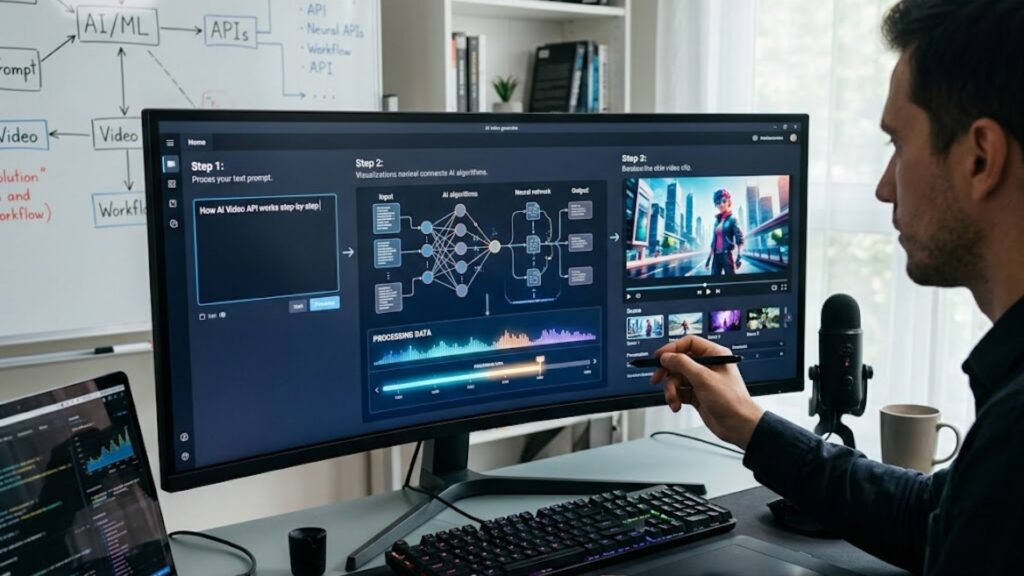
To understand how AI video API works, it is helpful to follow the lifecycle of a single video request from initiation to final playback. The entire process takes place programmatically, eliminating human intervention while ensuring consistent visual formatting across all outputs.
Step 1: Authentication and Payload Formatting
The creation pipeline begins when a client application sends an HTTP POST request to the cloud video endpoint. The request header includes authentication bearer tokens to verify account permissions and track usage quotas. The body of the request holds a structured JSON object containing all instructions required to build the video.
A standard payload specifies the primary script, target language, digital presenter characteristics, background imagery, caption styles, and desired resolution. By standardizing these parameters into a structured format, developers can automate video generation directly from content management systems or customer database triggers.
Step 2: Asynchronous Job Processing and Queue Management
Video generation requires significant compute resources, making synchronous real-time responses impractical for high-resolution rendering. Because of this processing overhead, video generation APIs use asynchronous job queuing to handle incoming tasks efficiently.
When an API endpoint receives a valid payload, it immediately returns a unique job identifier alongside an initial request status. The task enters a server processing queue where workload balancers assign the job to specialized hardware instances equipped with powerful graphics processing units.
Step 3: Neural Rendering and Frame Synthesis
During the core execution phase, multiple neural networks operate simultaneously to construct visual and auditory elements. Text-to-speech models convert written scripts into natural-sounding speech, complete with realistic cadence, inflection, and conversational pauses.
Concurrently, visual generation models create background scenes, synthesize digital avatars, or generate frame sequences based on text prompts. Synchronization algorithms align lip movements and facial expressions with the generated audio track to maintain natural visual rhythm throughout the clip.
Step 4: Asset Staging and Webhook Callbacks
Once frame synthesis finishes, media compilation utilities combine the audio tracks, visual frames, background music, and automated subtitles into a single file. The resulting video is encoded into web-friendly formats such as MP4 or WebM and uploaded to a cloud distribution bucket.
Reviewing the Syllaby AI developer API documentation provides complete code samples and parameter references for implementing these asynchronous callback listeners within modern software frameworks. When rendering completes, the API server sends an automated notification payload to the developer’s registered webhook URL containing event metrics, render times, file duration, dimensions, and the target storage URL.
Key Benefits of Implementing a Video Generation API for Developers

Building custom video engines from scratch requires massive capital investments in server infrastructure, machine learning research, and video processing software. Leveraging a specialized video generation API for developers offers several technical and financial advantages that accelerate product launch timelines.
Infinite Scalability and On-Demand Video Production
Traditional content production scales linearly with human workforce additions, creating bottlenecks when platform demand spikes. Automated video interfaces break this limitation by scaling dynamically across cloud infrastructure. Whether an application needs five customized videos or fifty thousand personalized marketing messages, cloud endpoints process tasks simultaneously across distributed compute clusters.
Drastic Reduction in Production Time and Overhead Costs
Manual video creation requires scriptwriting, voice recording talent, video editing software licenses, and lengthy rendering times on local devices. Programmatic generation reduces production timelines from days or hours down to a few seconds per finished clip. This cost efficiency enables startups and enterprise platforms to produce high-quality video content at a fraction of traditional media budgets.
Deep Personalization and Dynamic Content Localization
Content platforms can leverage automated video systems to deliver personalized media tailored to specific user segments. By combining database values with video templates, applications can instantly generate customized onboarding walkthroughs, individualized sales pitches, or localized advertisements. Multilingual speech models can also translate a single script into dozens of languages while preserving natural vocal characteristics.
- Lower Operational Expenses: Eliminates the need for expensive dedicated video editing hardware and complex local rendering farms.
- Rapid Deployment: Developers can integrate video generation capabilities into existing web or mobile applications using simple REST commands.
- Consistent Quality Control: Automated templates ensure every generated asset adheres precisely to brand guidelines and formatting rules.
- Data-Driven Automation: Video creation can be triggered automatically by user actions, CRM events, or scheduled background tasks.
How to Get Started with a Syllaby AI API Key for Custom Workflows

Obtaining a Syllaby AI API key grants developers instant access to automated script writing, voiceover generation, and avatar rendering endpoints. Setting up your developer account takes only a few minutes, allowing engineering teams to quickly evaluate API capabilities inside local testing environments.
First, navigate to your developer portal dashboard and open the security settings panel to generate a secure secret key. Store this key safely within environment variables rather than hardcoding it into client-facing applications, as it grants full programmatic access to your rendering quotas.
Developers initiate generation tasks by sending an HTTP POST request to the generation endpoint. The request includes the authentication bearer token in the headers alongside a JSON body containing the script text, presenter identification, vocal selection, and preferred aspect ratio. The API returns an immediate acknowledgment payload containing a tracking ID that allows background workers to monitor rendering progress.
Reviewing flexible enterprise pricing tiers helps organizations select production plans that match their expected monthly video rendering volume and concurrency demands. Selecting the appropriate tier ensures your application maintains high availability during peak user traffic without encountering unexpected API rate limits.
Major Industry Use Cases for Video Generation APIs
Automated video creation technology serves a wide variety of commercial applications across consumer software, corporate training systems, and digital marketing platforms. Organizations adopt API-driven video generation to replace slow manual publishing workflows with rapid automated software loops.
E-Commerce and Dynamic Product Showcases
E-commerce marketplaces manage catalogs containing thousands of distinct products, making manual video creation for every item impossible. Using an automated API, platforms can scrape product page details, descriptions, and static images to build dynamic video ads automatically. Whenever a product price changes or a new inventory item arrives, the system triggers a background request to update video assets instantly.
Social Media Automation and Short-Form Content Scaling
Digital publishers and content creators use video APIs to maintain consistent daily publishing schedules across platforms like TikTok, YouTube Shorts, and Instagram Reels. Content teams can feed blog posts, news articles, or industry summaries into an automated pipeline that generates fully edited vertical videos with captions, background visuals, and voiceovers.
Educational Platforms and Automated Learning Modules
EdTech platforms leverage video generation interfaces to transform written textbook lessons and training documents into interactive video modules. Students can consume course content in visual formats, while educators can update curriculum videos simply by editing text documents rather than re-recording entire video modules.
Exploring tailored digital marketing industries reveals how specialized sectors like real estate, healthcare, and finance use programmatic video tools to communicate effectively with target audiences. Automated scripts allow professionals in these fields to publish expert advice videos consistently without spending hours in front of a camera.
Enterprise Training and Internal Communications
Large enterprises use automated video endpoints to streamline corporate communications, employee onboarding, and regulatory compliance updates. Human resource departments can convert long PDF manuals into engaging video series narrated by professional AI presenters, improving retention rates while reducing internal video production overhead.
Technical Comparison of Video Generation Frameworks
Selecting the correct API framework depends heavily on your application’s target audience, visual style preferences, and rendering budget. Different system architectures prioritize visual realism, avatar lip-sync accuracy, or rapid script rendering.
| Feature / Metric | Generative AI Video APIs | Avatar & Presenter APIs | Cloud Transcoding APIs |
| Primary Input Type | Text prompts and reference images | Text scripts and presenter choices | Pre-recorded raw video clips |
| Primary Output Style | Cinematic scenes and stylized animations | Talking-head human presenter | Re-encoded original video files |
| Average Generation Speed | Moderate (15 to 45 seconds per clip) | Fast (5 to 15 seconds per clip) | Ultra-fast (Near real-time) |
| Ideal Primary Use Case | Creative storytelling and visual effects | Educational content and product ads | Format conversion and CDN streaming |
| Customization Depth | High creative variability | High voice and text control | High bitrate and resolution control |
| System Complexity | High prompt optimization required | Low structured script input | Moderate media engineering |
Best Practices for Implementing a Video Generation API for Developers

Successfully integrating video generation capabilities into enterprise applications requires careful attention to software architecture, error handling, and performance optimization. Following proven development patterns prevents system bottlenecks and ensures high user satisfaction.
Prompt Optimization and Structured Input Schemas
When using text-to-video generation endpoints, input prompt quality directly influences visual output consistency. Developers should implement backend validation logic that formats raw user inputs into structured, descriptive prompts before sending payloads to the API. Adding consistent styling parameters, lighting descriptions, and camera movement instructions helps maintain visual coherence across all generated videos.
Managing Render Latency with Webhooks vs. Polling
Because video generation is an asynchronous process, client applications must handle long-running render jobs without blocking user interfaces. Polling the server every few seconds creates unnecessary network overhead and can exhaust API rate limits.
Implementing webhook listeners is the most efficient architectural pattern for managing render notifications. When a user submits a request, your server sends the creation task to the API gateway and receives a job identifier while displaying a pending state to the user. Once the background rendering completes, the API gateway sends an automated HTTP POST callback directly to your server, which then updates the user interface with the completed video URL.
Error Handling, Retry Logic, and Fallback Strategies
Cloud services occasionally experience transient network glitches, rate limiting, or temporarily high rendering queues. Developers should design resilient request logic that includes exponential backoff retries for failed server requests.
Additionally, applications should validate input text lengths, unsupported special characters, and missing asset URLs before making API calls. Providing clear error messages to end-users when inputs fail validation prevents unnecessary system calls and maintains a smooth user experience.
Content Moderation, Security, and Compliance Standards
Platforms that allow end-users to generate custom videos must implement robust content moderation controls. Automated video endpoints often include built-in safety filters that reject requests containing harmful, illegal, or copyrighted material. Combining server-side moderation checks with API safety features ensures your platform complies with digital publishing standards and legal requirements.
Choosing the Right API Solution for Your Growth Strategy
Selecting an automated video generation partner requires evaluating more than just raw image quality. Software architects must assess developer documentation clarity, infrastructure stability, request latency, and long-term pricing predictability.
Evaluating these factors ensures your chosen platform can scale gracefully alongside your application’s user base. High system uptime, predictable request queues, and responsive technical support are essential when video creation forms a core feature of your application.
If you have specific architectural questions or need custom operational support, you can reach out to support teams to discuss tailored integration assistance for your enterprise infrastructure. Direct support helps engineering teams optimize payload construction, streamline webhook architecture, and achieve maximum rendering performance.
Frequently Asked Questions

What is the difference between a video streaming API and an AI video generation API?
A video streaming API handles hosting, transcoding, adaptive bitrate delivery, and video playback for pre-recorded media files across web browsers and mobile devices. In contrast, an AI video generation API creates completely new video assets programmatically from text scripts, images, or prompt instructions using neural network models.
How long does it take an AI video API to render a short video clip?
Render times vary based on clip resolution, visual complexity, frame rate, and active server queue loads. Most optimized commercial video generation endpoints complete a 30-second short-form video render in approximately 10 to 30 seconds.
Can developers customize AI avatars and voices using a video generation API?
Yes, most modern video generation platforms allow developers to select from extensive libraries of synthetic presenters, accents, and languages. Many enterprise endpoints also support custom voice cloning and personalized digital avatar creation using short training video uploads.
How do webhooks improve efficiency when integrating a video generation API?
Webhooks eliminate the need for client applications to repeatedly poll server endpoints asking if a rendering job is complete. Instead, the video API server automatically sends an HTTP request to your backend server as soon as the video asset is ready, saving network bandwidth and compute resources.
What hardware or infrastructure is required on the client side to run an AI video API?
No specialized rendering hardware or GPUs are required on the client side. All intensive neural network processing and media encoding occur on remote cloud servers, meaning developers only need basic network capabilities capable of sending and receiving HTTP JSON payloads.
Conclusion: The Future of Programmatic Video Creation
Automated video generation APIs are transforming how software applications and content platforms create, customize, and distribute visual media. By shifting video production from manual desktop editing software to scalable cloud server architectures, companies can publish personalized, high-quality video content at unprecedented volume.
Whether you are building dynamic e-commerce product videos, scaling automated social media channels, or enhancing online learning platforms, programmatic video pipelines offer unmatched operational speed and cost efficiency. Authenticating your system using a Syllaby AI API key equips your development team with the powerful automation tools needed to power the next generation of interactive media applications.