





Demand for efficient, easy-to-use video production tools has grown. Text to Scenes AI is a leading Android app that combines automation and personalization for both new and experienced creators. This article examines the features that make it a strong choice: automated scene generation, customization options, social media support, and lead-generation capabilities. Many users find traditional editing software complex. Text to Scenes AI streamlines production, lowers technical barriers, and supports creative output. The article outlines its key features, automation efficiency, personalization, and scalability for small businesses.
Key Takeaways
- Text to Scenes AI uses advanced AI to automate video scene generation from simple text prompts on Android devices.
- The app offers a user-friendly interface designed for both novice and experienced video creators to enhance creativity.
- AI-powered automation significantly reduces video production time while maintaining high-quality, cohesive content output.
- Personalization features allow users to customize scenes, characters, and narratives to match brand identity or style.
- Text to Scenes AI supports rapid social media video creation, boosting engagement and lead generation for marketers.
- The app enables scalable video production, ideal for small businesses needing cost-effective and consistent content output.
- It accommodates diverse industries by generating tailored video content relevant to specific market needs.
- Compared to other Android AI video tools, Text to Scenes AI excels in speed, efficiency, and professional-grade results.
- The platform includes comprehensive support, tutorials, and flexible subscription plans to assist users at all levels.
What Makes Text to Scenes AI Stand Out Among Android Video Creation Apps?
Text to Scenes AI differentiates itself through its combination of advanced technology and user-focused design. The app applies AI to automate scene creation, which lowers the skill barrier for video production. These capabilities reduce production time while preserving quality, making professional video output more attainable for a wide range of users.
Unique Features
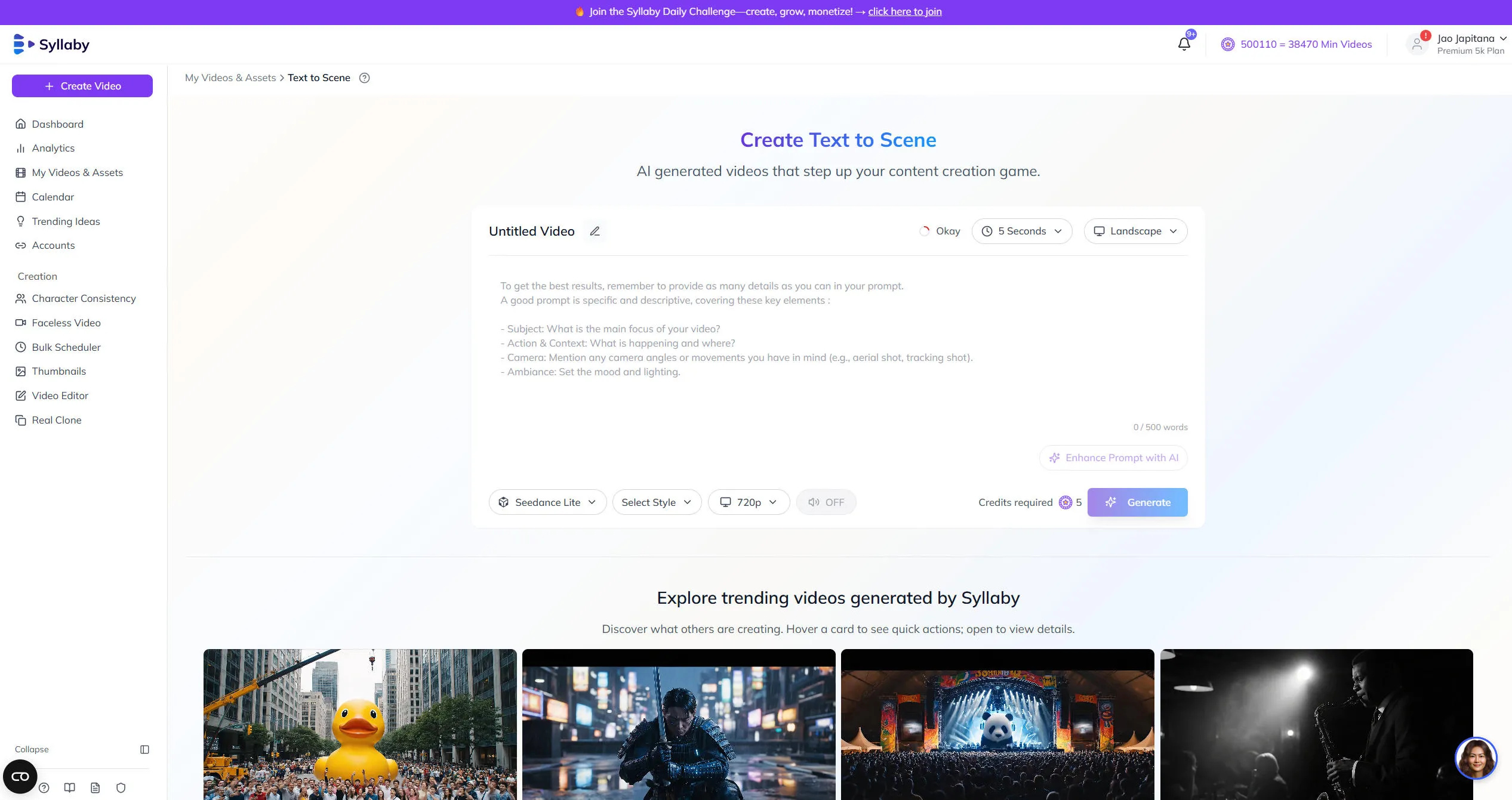
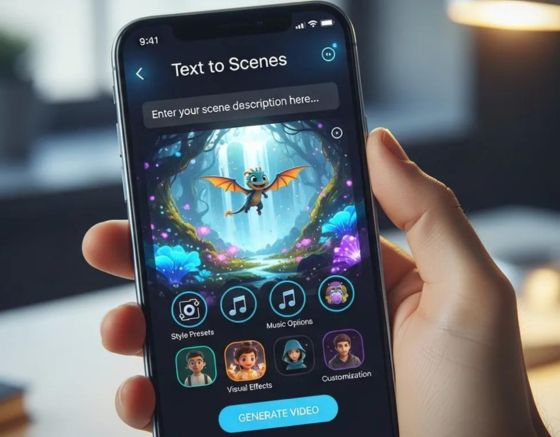
The app’s AI-driven scene generation converts simple text prompts into coherent visual sequences. It interprets user input to produce scenes that reflect the intended message. The platform also maintains character consistency across scenes to preserve narrative continuity. Customization controls let users adjust visuals and storytelling to suit target audiences, improving engagement and message clarity.
Research highlights the growing importance and capabilities of AI in automating video content creation and scene generation.
AI-Powered Video Creation & Scene Generation Visla AI is an AI-powered video creation and editing tool aimed at businesses. It can generate professional multi-scene videos, though it may produce irrelevant scenes in some cases. Artificial intelligence–powered video content generation tools, CM Roșca, 2024
User Interface
The interface is intentionally simple and organised. Menus and controls are clear, so users can access core features quickly. This design reduces onboarding time for non-technical users and allows creators to concentrate on content decisions rather than tool mechanics.
Performance Advantages
Text to Scenes AI delivers fast rendering and efficient production workflows. Quick output times support frequent publishing cycles. The app scales to handle batch production, enabling marketers and small teams to maintain a steady stream of content without compromising visual quality.
How Does Text to Scenes Automate Video Creation Efficiently?

Automation features reduce manual editing and speed up production. The app applies AI algorithms to interpret prompts and assemble appropriate scenes. A guided workflow leads users through each stage, which minimises errors and ensures a predictable production process from input to final render.
What Personalization Features Enhance User Experience on Android?
Personalization tools adapt output to user preferences and brand requirements. Automated settings learn from inputs and apply consistent styles across videos. Users can customise scenes, characters, and narratives to align content with brand identity or campaign goals, producing distinctive and relevant videos.
The emphasis on tailoring content to individual preferences is a well-researched area in mobile application development.
Personalized Video Adaptation for Mobile Apps Personalized multimedia that matches user preferences and the usage context improves the user experience and is increasingly important. The referenced paper describes an architecture for personalized video adaptation and presentation in mobile applications guided by automatically generated annotations. Annotation based personalized adaptation and presentation of videos for mobile applications, C Concolato, 2011
How Does Text to Scenes AI Support Social Media Content and Lead Generation?
Text to Scenes AI enables rapid production of high-quality visuals suitable for social channels. Fast turnaround helps marketers respond to trends and audience needs. The focus on clear, polished visuals increases the likelihood that content will attract attention, drive engagement, and support lead-generation objectives.
The strategic use of AI for generating promotional content for social media is a rapidly evolving field.
AI Video Generation for Social Media Marketing
An AI-powered dynamic banner and video generation solution automates production of high-quality promotional assets for banners and social media. A Survey on Smart Promo Creator: AI-Driven Dynamic Video Generation for Banners and Social Media Marketing, 2024
Why Is Text to Scenes Ideal for Content Creators and Marketers?
Creators and marketers gain from the app’s ability to produce targeted videos efficiently. Content can be tailored to audience segments and distributed through integrated marketing tools. This reduces production friction and helps campaigns achieve broader reach and consistent messaging.
What Types of Videos Can Be Created for Social Media Marketing?
Text to Scenes AI supports production of several common social media formats, including:
- Promotional Videos: Highlight products or services to attract potential customers.
- Explainer Videos: Simplify complex concepts for better audience understanding.
- Tutorials: Provide step-by-step guidance on using products or services effectively.
These formats help engage audiences and support conversion goals across social channels.
What Are the Scalability Advantages of Text to Scenes for Small Businesses?
Small businesses benefit from the app’s cost-effective production and simple workflows. The platform reduces the need for large production teams and allows small staff to produce consistent, professional video content. This supports regular content schedules while keeping costs manageable.
How Does the Platform Handle Diverse Industry Video Production?
The app supports industry-specific content by applying templates and styles suited to different sectors. Automated generation produces relevant visuals and messaging for target markets, which helps businesses maintain a competitive presence within their industry.
What Subscription Plans Support Business Growth?
- Basic Plan – $39/month
- Standard Plan – $79/month
- Premium Plan – $149/month
These tiers offer scalable options so organisations can select the level of features and capacity that match their needs and budget.
How Does Text to Scenes AI Compare to Other AI Video Editing Tools on Android?
Text to Scenes AI distinguishes itself by combining rapid output with a user-centred interface. Its scene-generation capability and streamlined workflow reduce the learning curve and improve efficiency. The result is professional-quality video without the complexity of traditional editing suites.
How Does Text to Scenes Address Common User Challenges?
The platform reduces reliance on advanced editing skills by automating core tasks. Templates and guided workflows make it possible for users with limited technical knowledge to produce polished videos. This approach addresses common barriers to entry and shortens production timelines.
What Technical Workflow Powers Text to Scenes AI Video Creation on Android?
The workflow begins with user prompts that the app processes using natural language processing (NLP) to generate scene concepts. These concepts are mapped to visual assets and assembled into a sequence. The integration of NLP, asset selection, and rendering ensures the final video aligns with user intent.
Where Can Users Find Pricing, Support, and Additional Resources for Text to Scenes?
Pricing, support resources, and additional materials are available within the app. The platform includes tutorials, case studies, and customer support to help users adopt best practices and maximise the tool’s capabilities.
If you are interested in exploring how Text to Scenes can be applied to your specific sector, visit our industries page.
For more information about our company and our mission, please visit the Syllaby website.
To learn more about our different subscription options and find the plan that best suits your needs, visit our pricing page.
Frequently Asked Questions
What devices are compatible with Text to Scenes AI?
Text to Scenes AI is designed for Android devices and is optimised for multiple screen sizes and performance profiles. It runs on compatible smartphones and tablets. The app is not currently available for iOS or desktop platforms.
Can Text to Scenes AI be used for live streaming or real-time video creation?
The application focuses on pre-recorded video production and does not support live streaming or real-time video generation. Users may prepare videos in advance and incorporate them into live broadcasts or events as pre-produced content.
How does Text to Scenes AI ensure video quality and consistency?
The platform applies advanced AI algorithms to interpret prompts and produce scenes that match the intended narrative and visual style. Automated processes preserve character design and thematic consistency, resulting in a polished final product suitable for business use.
What types of support are available for new users of Text to Scenes AI?
New users have access to step-by-step tutorials, a comprehensive FAQ, and customer support. The platform also provides case studies and sample projects to demonstrate effective workflows and help users improve their output.
Is there a free trial available for Text to Scenes AI?
Text to Scenes AI does not currently offer a free trial. Prospective users can evaluate the app through the available subscription plans, which are structured to suit different needs and budgets.
How frequently does Text to Scenes AI receive updates and new features?
The development team regularly releases updates to improve performance and add features. Updates are informed by user feedback and may include enhancements to customisation, performance optimisations, and new tools to streamline production.
Conclusion
Text to Scenes AI combines automation and personalization to simplify video production on Android. It enables fast, high-quality output that supports social media engagement and lead generation. Organisations and creators can use the app to streamline workflows, maintain consistent content, and elevate their brand presence. If you have any questions or need assistance, please do not hesitate to contact us.